How to Backtest Trading Strategies Using AI
Backtesting answers one question: would these rules have made money on this market? Getting the number is the easy half. This guide covers the hard half — reading what the number means, and knowing which figures your TradingView plan is not showing you.
What AI can and cannot do here
A backtest is arithmetic. Rules are applied to historical bars, trades are simulated, and the results are totalled. On TradingView that work is done by the Strategy Tester, and no language model is involved or should be.
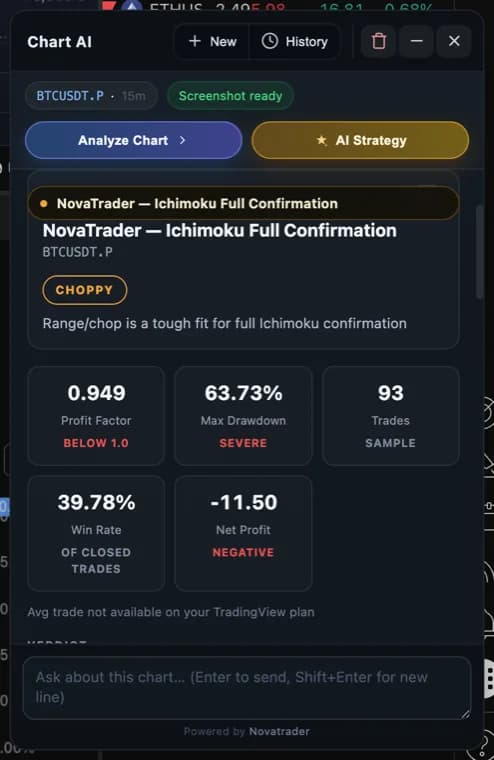
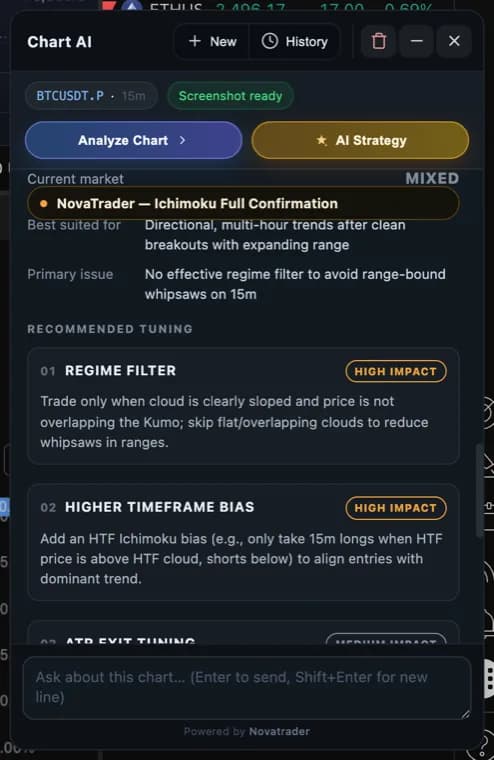
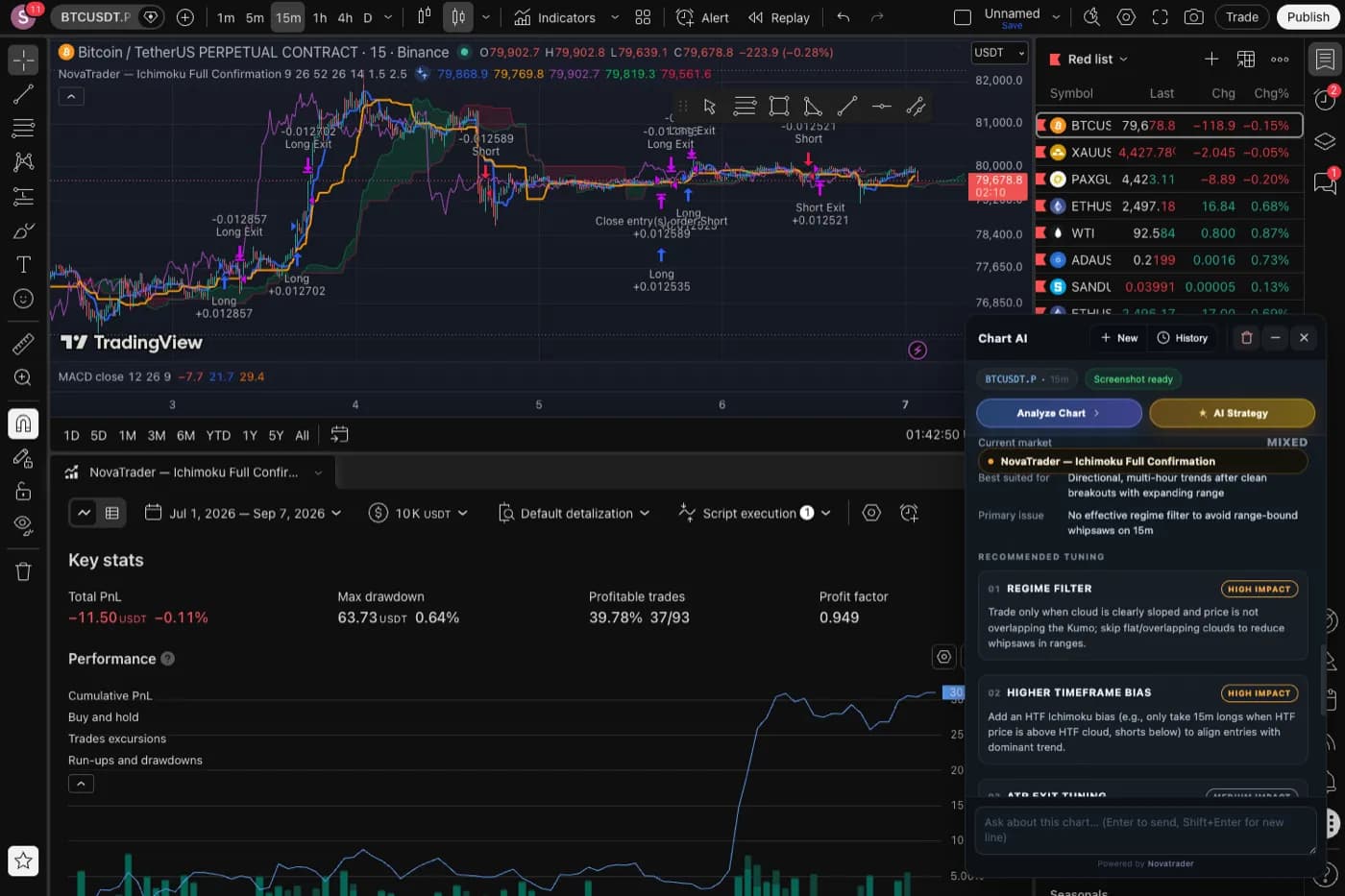
What AI is genuinely good at is the part that comes after: looking at a profit factor of 0.949 across 93 trades and explaining that the strategy is a trend system being run in a range, that its confirmation rules are entering late, and that its stop is too wide for the volatility it is actually seeing. That is reading, not calculation.
The distinction matters. If a tool produces backtest statistics itself rather than reading them off the platform, those statistics cannot be checked against anything. NovaTrader renders the Strategy Tester’s own figures and never writes one of its own — which is also why a metric your plan restricts appears as unavailable instead of quietly appearing as a number.
Backtesting a strategy, step by step
- 01
Install the NovaTrader extension for Chrome
Everything below happens inside TradingView, so the extension has to be installed first. It is free, it is distributed only through the Chrome Web Store, and it adds a panel to the TradingView chart you already use — no separate app, no data to import, and no change to your TradingView account.
Get it on the Chrome Web Store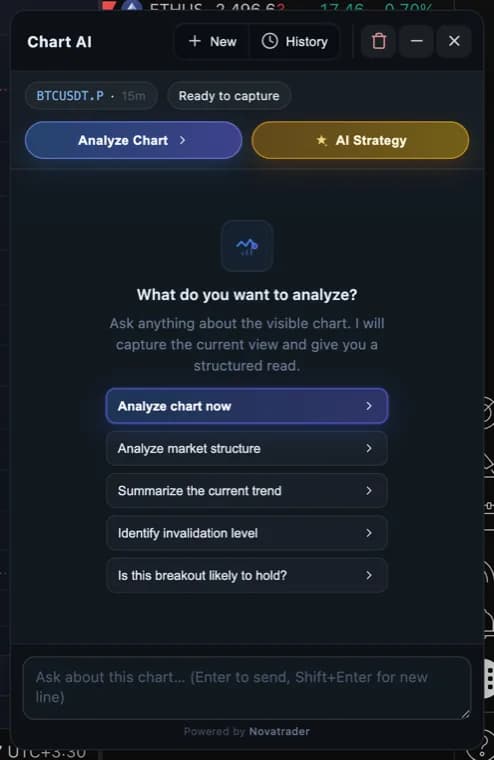
- 02
Open a chart and pick a strategy
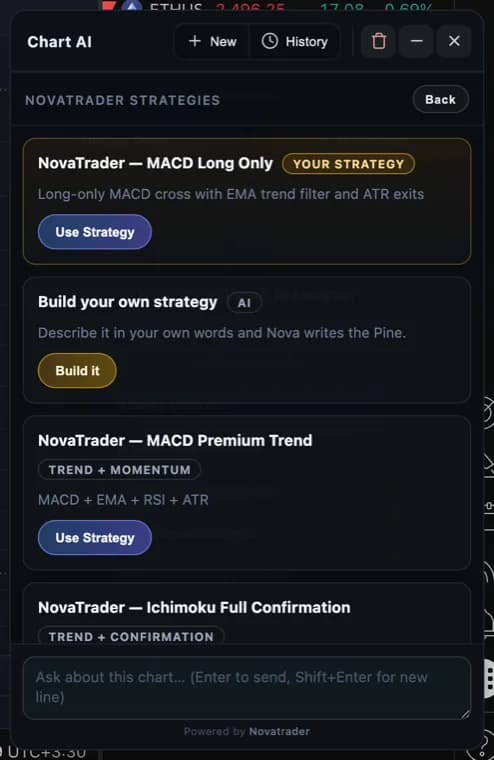
Open any TradingView chart on the symbol and timeframe you actually trade, then choose a strategy. The strategy list is served from NovaTrader, so it is the same set of tested scripts for everyone — nothing is pasted into the Pine editor by hand.
- 03
Let it compile and run on your chart
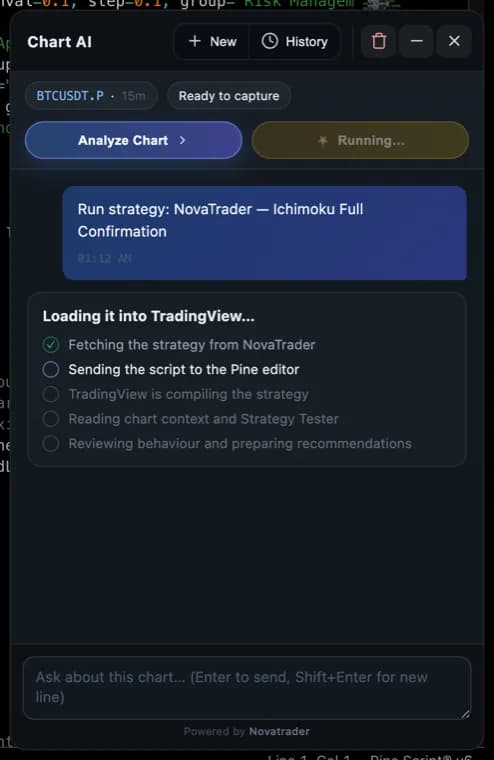
The Pine script is loaded into TradingView's own editor and added to the chart. Compilation is verified before anything else happens: if the script errors, the run stops there and says so rather than analysing an empty chart.
- 04
Read the Strategy Tester numbers
TradingView's Strategy Tester produces the backtest itself — trades, profit factor, drawdown. Those figures are read off the chart and shown as they are. A metric your TradingView plan does not expose is reported as unavailable, never estimated and never shown as zero.
- 05
Read the diagnosis, not just the numbers
A profit factor below 1 tells you the strategy lost money over the tested window. It does not tell you why. The review names the market regime, the entry timing, the exit model and the indicator state, and says which of them is actually hurting the result on this symbol and timeframe.
- 06
Change one rule and re-run
Describe the change in plain words — widen the stop, only take longs, require a trend filter. The Pine strategy is rewritten and saved as your own copy; the original template is left alone. Run it again and compare the same Strategy Tester numbers.
Read the video’s result carefully. That change turned the backtest from −96.89 to +9.16 and took the profit factor from 0.478 to 1.489 — but it also cut the sample from 81 trades to 10. Ten trades is not enough to conclude anything, which is exactly why the trade count sits next to the other metrics. The honest summary is “promising, needs a longer test”, not “fixed”.
How to read the four numbers that matter
Most backtest reports show a dozen figures. Four of them carry almost all the signal, and one of those decides how much the others are worth.
| Metric | What it means | When to worry |
|---|---|---|
| Trades | Sample size. Decides how much every other number is worth. | Under ~30 — outliers dominate |
| Profit factor | Gross profit ÷ gross loss. 1.0 is break-even before costs. | Below 1.0, or above 2.0 on a small sample |
| Max drawdown | Worst peak-to-trough fall in equity. | Larger than you would actually sit through |
| Win rate | Share of closed trades that won. | Only meaningful next to the reward-to-risk |
A high win rate with a poor profit factor means the losers are bigger than the winners. A strong profit factor over 12 trades means very little. The combination is the story, not any single figure.
Four ways a backtest lies to you
- Overfitting. Tuning parameters until the past looks good produces a strategy that has memorised history rather than learned anything. If a small change to a setting collapses the result, the result was noise.
- Too few trades. Thirty trades cannot separate skill from luck. Widen the window or the timeframe before drawing a conclusion.
- One market, one regime. A trend strategy tested only through a trending year will look excellent. Test it through a range too — that is where it will actually hurt you.
- Ignoring costs. Commission and slippage turn many marginal strategies negative. A backtest run at zero cost is a different strategy from the one you would trade.
Try it on your own chart
NovaTrader runs inside TradingView. Pick a strategy, let it compile, and read the backtest with the reasoning attached.
Frequently asked questions
- Can AI backtest a trading strategy on its own?
- No, and a tool that claims to is worth distrusting. The backtest itself is arithmetic run over historical bars — on TradingView that is the Strategy Tester. What AI adds is the reading: why a strategy with a profit factor below 1 is failing on this symbol and timeframe, which rule is responsible, and what to change. NovaTrader uses TradingView's own Strategy Tester for the numbers and never generates a statistic itself.
- Which backtest metrics does TradingView hide on a free plan?
- It varies by plan, but profit factor, net profit, max drawdown and average trade are commonly restricted, while total trades and the win-rate breakdown stay visible. NovaTrader reads whatever your account exposes and marks the rest as unavailable. It will not infer a hidden metric from the chart, and it will not substitute zero — a strategy with zero trades and a strategy whose figures could not be read are different situations and are shown differently.
- What is a good profit factor in a backtest?
- Profit factor is gross profit divided by gross loss, so 1.0 is break-even before costs. Below 1.0 the strategy lost money over the tested window. Between 1.0 and about 1.3 the edge is thin enough that commissions, slippage and a different sample can erase it. Above roughly 2.0 on a small sample is more often a sign of overfitting than of quality — check the trade count before trusting it.
- How many trades does a backtest need to mean anything?
- Fewer than about 30 trades tells you almost nothing; a handful of outliers moves every statistic. Around 100 is where win rate and profit factor start to be worth reading. The trade count is shown next to the other metrics for exactly this reason — it is the number that decides how much the others are worth.
- Does this change my TradingView indicators?
- No. NovaTrader only removes studies it added itself, matched on its own name prefix. Your own indicators and strategies stay on the chart untouched.
- Can I backtest my own strategy idea?
- Yes. Describe the entry and exit rules in plain words and a Pine v6 strategy is generated, checked, and saved to your list. It is validated before it is stored — a script that would not compile is rejected rather than saved — and from there it backtests through TradingView's Strategy Tester like any other strategy.
Backtest results describe the past and do not predict future returns. Nothing on this page is financial advice.