Install the NovaTrader extension
AI chart analysis inside TradingView — on the chart you're already looking at.
Free · works on any TradingView chart · what it does
Installs from the Chrome Web Store in one click — no zip file, no Developer mode, and Chrome updates it for you.
- 1Add it to Chrome
Open the Chrome Web Store listing and click Add to Chrome. Chrome installs it and keeps it up to date on its own.
- 2Sign in with your email
Open the panel and enter your email. We send a 6-digit code — no password. If you're new, entering the code creates your Extension account.
- 3Open a TradingView chart
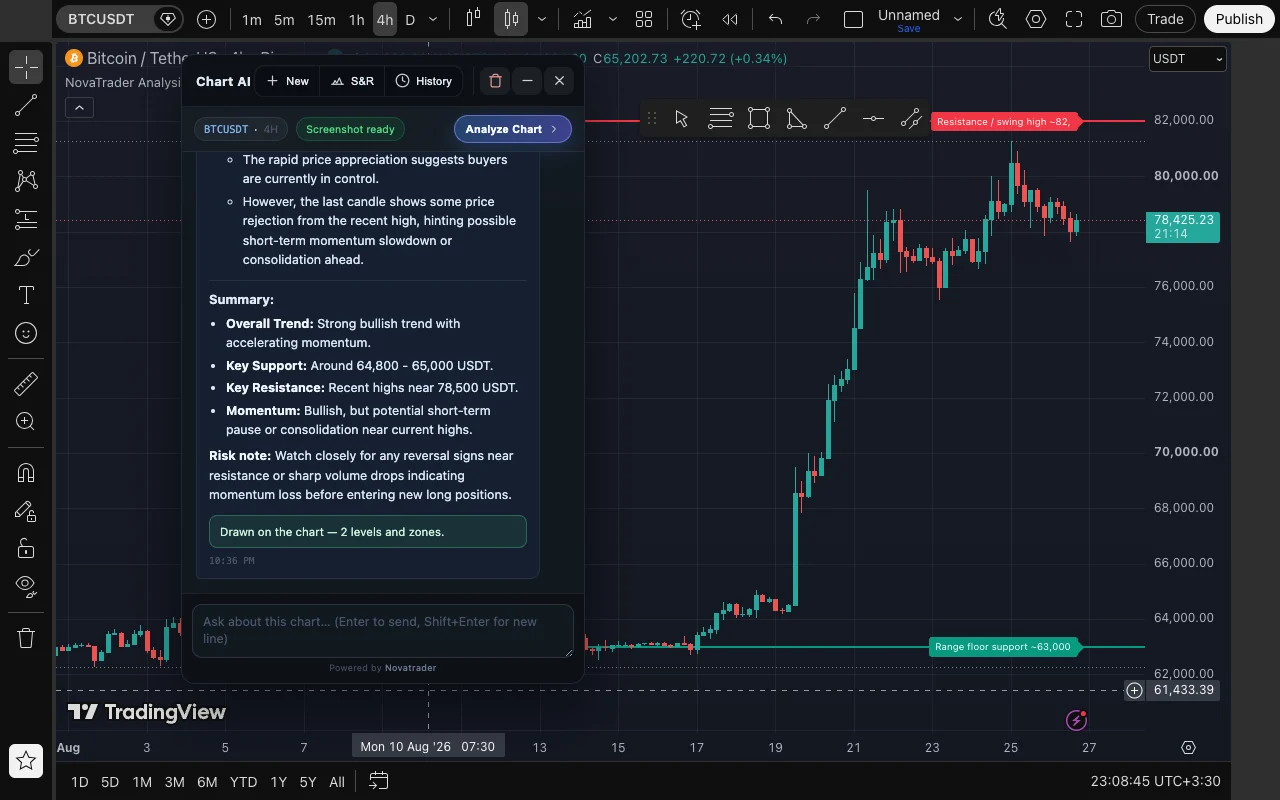
Go to any TradingView chart page. A floating NovaTrader button appears at the bottom-right.
- 4Get your analysis
Ask about the chart in view. You get direction, confidence, entry zone, stop loss, targets and the reasoning — saved to your NovaTrader history.
Sign in and see your plan and remaining AI requests.
Before you start: what the extension captures
The extension only acts when you ask it to. When you send a message in the panel, it captures your currently visible TradingView tab — the whole visible area, not just the chart — and sends that image with your question to NovaTrader, which uses OpenAI to produce the analysis. Nothing is captured while you browse, and no other tab or window is ever read.
We do not store the screenshot; we keep the text of your question and the analysis so your history works. If something sensitive is on screen — balances, positions, an open dialog — hide it before requesting an analysis. Full detail in our Privacy Policy.
Good to know
- What does it send?
- Your question plus a screenshot of your visible TradingView tab — the whole visible area, not just the chart. Nothing is captured until you send a message, and the screenshot is not stored on our servers.
- Does it place trades?
- No. It reads the visible chart and answers — you stay fully in control of execution.
- Where do analyses go?
- Into your Extension analysis history. The Extension has its own account and its own monthly allowance, separate from the NovaTrader app.
- Which permissions?
- TradingView pages (to show the panel), our own backend (to answer your requests), and screen-capture access, which Chrome only grants to extensions that request access to all sites. Full details in the Privacy Policy.
NovaTrader provides analytical and educational tools only. Nothing here is financial advice or a guarantee of any trading outcome. Trading involves risk of loss.