AI for TradingView — analyze charts, build strategies and backtest with AI
NovaTrader brings an AI assistant into your TradingView workflow. It reads the chart you are on — symbol, timeframe, indicators and your own drawings — so you can ask about market structure, work with Pine Script, and understand what your Strategy Tester results actually mean, without switching tabs.
Free plan — 150 AI requests per 30 days · No credit card required · See plans
A real recording on a live chart. Narrated, with the model’s thinking time sped up and labelled — the unedited take is here.
- Runs inside TradingView
- Pine Script v6 assistance
- Reads TradingView's Strategy Tester
- No automated trade execution
What is NovaTrader AI for TradingView?
NovaTrader is a Chrome extension that adds a TradingView AI assistant to the chart pages you already use. Instead of describing your setup to a chatbot in another tab, you open a panel on the chart itself and ask.
The difference is context. When you send a message, NovaTrader reads the chart’s own state through TradingView’s page API — the symbol, the timeframe, the latest candle, how many bars are loaded, the visible time range, every indicator on the chart together with its inputs, and the drawings you have placed. That goes to the model with your question, alongside a capture of the visible tab. You are not re-explaining your chart on every message.
From there it does three jobs: AI chart analysis — market structure, trend, momentum, levels and what your indicators are actually showing; Pine Script, turning an idea in plain English into Pine v6 you can copy straight into TradingView’s editor, or explaining a script you already have; and TradingView strategies, which it runs, waits for, then reads the Strategy Tester and explains.
What it does not do is invent numbers. Backtest figures come from TradingView’s own Strategy Tester; a metric your plan restricts is reported as unavailable rather than estimated. And it never places a trade — there is no broker connection at all.
- Chart-aware AI
- Understands the TradingView chart you are viewing, including its indicators and your drawings.
- Pine Script
- Build, edit and explain Pine Script v6 without leaving the chart page.
- Strategy analysis
- Review how a strategy behaved using TradingView's own Strategy Tester figures.
- TradingView workflow
- No copying chart context between tools on every question.
Symbol and timeframe · Latest OHLCV and price · Loaded bar count · Visible time range · Indicators on the chart and their inputs · Your drawings, by type
How to use AI with TradingView
Four steps, and the first one is the only setup. Pick a step to see it.
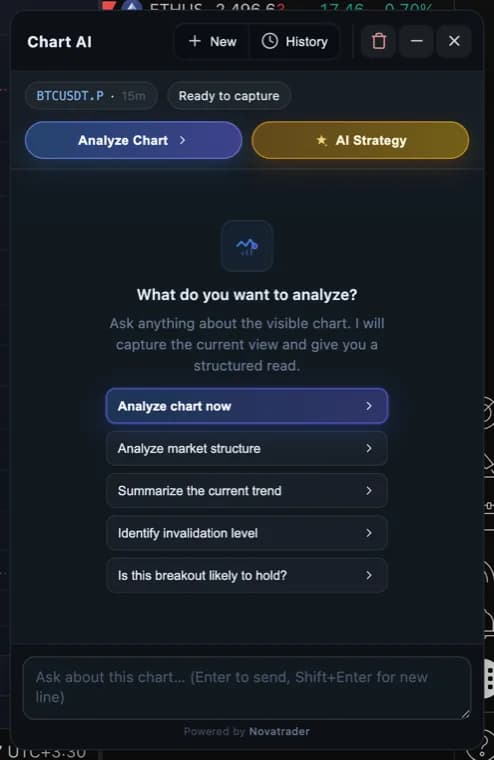
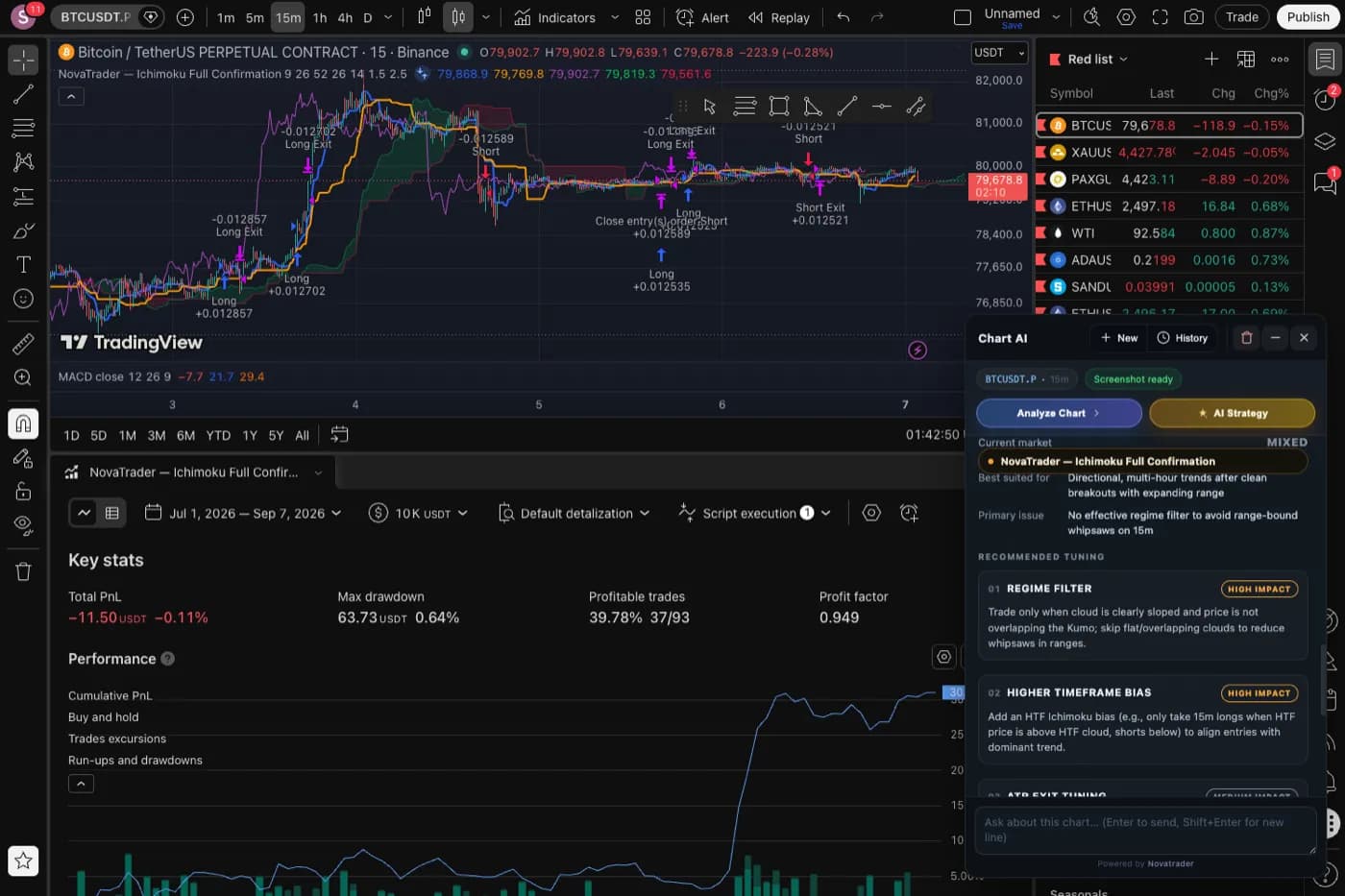
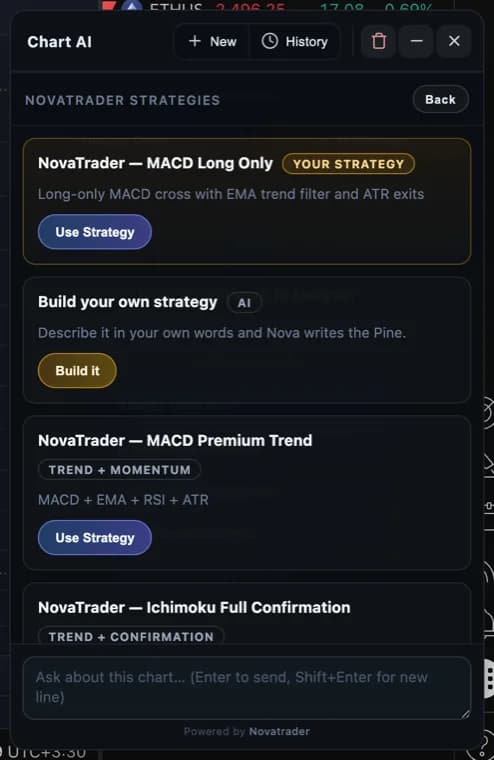
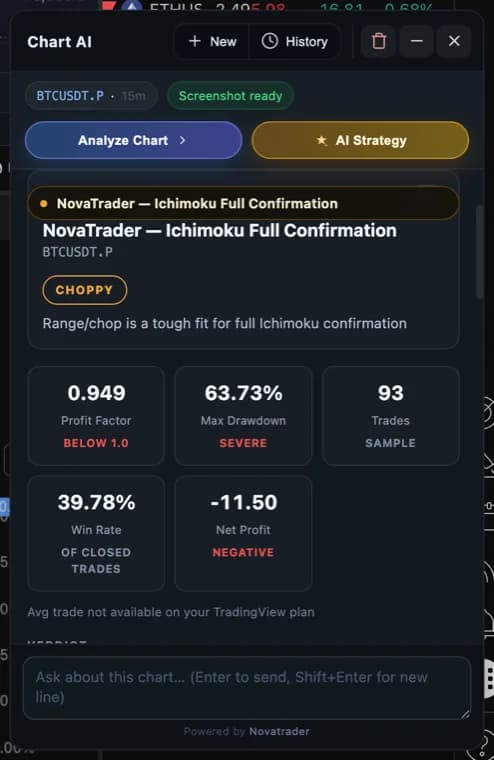
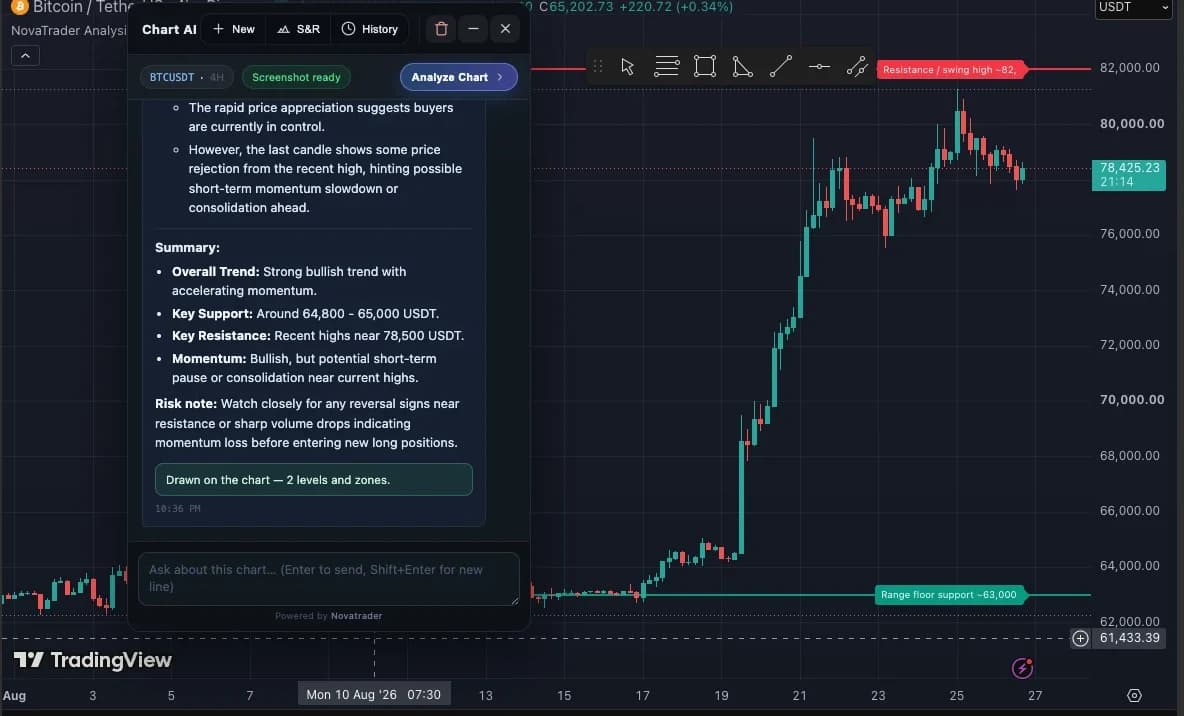
AI chart analysis inside TradingView
Ask about the chart in front of you. The answer arrives in the panel, on the same screen as the price action it is describing.
- Market structure — Higher highs and lows, ranges, breaks, and where the reading would be invalidated.
- Trend and momentum — What the current leg is doing and whether momentum confirms it.
- Indicator context — What the indicators already on your chart show, read with their inputs.
- Key levels — The support and resistance areas visible on the chart you are on.
- Follow-up questions — Keep asking in the same conversation — the chart context comes along each time.
Analyze BTCUSDT on the 15-minute chart. What is the current market structure?
Analysis is explanation, not prediction. NovaTrader describes what the chart shows and what would invalidate that reading — it does not forecast price, and nothing it returns is financial advice.
Build and edit Pine Script with AI
Describe an indicator or a strategy in plain English and get Pine v6 back, with a one-click copy into TradingView's editor.
“Create an EMA crossover strategy with RSI confirmation and an ATR-based stop loss.”
- Generate
- Explain
- Modify rules
- Add filters
- Change entries and exits
It can also read a script and explain what a compiler complaint is pointing at. It is an assistant for the code, not a guaranteed compiler.
Copy the Pine into TradingView’s own editor and add it to the chart. When NovaTrader applies a strategy itself, it checks TradingView actually compiled it.
//@version=6
strategy("NovaTrader — Ichimoku Full Confirmation", overlay=true,
         default_qty_type=strategy.percent_of_equity, default_qty_value=10)

// INPUTS
tenkanLen    = input.int(9,  "Tenkan (Conversion)", group="Ichimoku")
kijunLen     = input.int(26, "Kijun (Base)",       group="Ichimoku")
senkouBLen   = input.int(52, "Senkou Span B",      group="Ichimoku")

atrLen       = input.int(14,  "ATR Length",     group="Risk Management")
stopATR      = input.float(1.5, "Stop Loss ATR",  group="Risk Management")
targetATR    = input.float(2.5, "Take Profit ATR",group="Risk Management")
Excerpt from a strategy NovaTrader ships and applies to the chart.
Understand TradingView backtests with AI
NovaTrader does not run its own backtest. It applies the strategy to your chart, lets TradingView's Strategy Tester do the arithmetic, then reads the result and explains it.
- 01
Run the strategy on your chart
- 02
Review the Strategy Tester figures
- 03
Understand which rule is hurting it
- 04
Modify one rule
- 05
Test again and compare
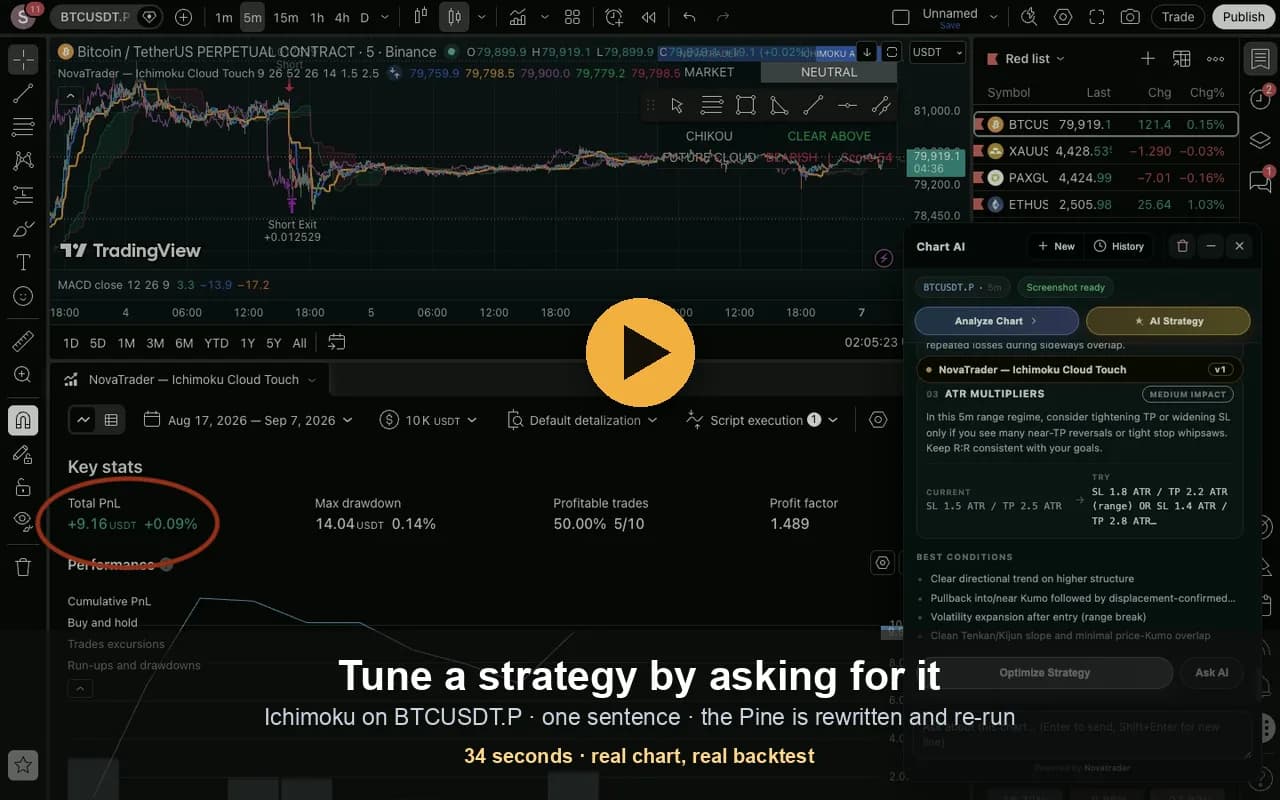
From the recorded walkthrough on the backtesting guide.
The change turned that backtest positive — and cut the sample from 81 trades to 10. Ten trades is not enough to conclude anything, which is exactly why the trade count sits next to the other figures. One run on one symbol is not a result you should expect to repeat.
Net profit · Profit factor · Win rate · Max drawdown · Trades · Avg trade — all from TradingView’s Strategy Tester.
“This is a trend system being run in a range: the confirmation rules enter late and the stop is wide for the volatility actually present. Consider testing a trend-strength filter before changing the exits.”
If your TradingView plan does not expose a metric it is marked unavailable, never estimated and never shown as zero.
What can you ask NovaTrader on TradingView?
The panel ships with quick prompts, and anything below is a question you can type.
- Analyze market structure
- Summarize the current trend
- Identify invalidation level
- Is this breakout likely to hold?
- Explain the indicators currently on my chart
- Mark the support and resistance areas you see
- Create a MACD strategy in Pine Script
- Add an ATR-based stop loss to this strategy
- Explain what this Pine Script does
- Why did this strategy perform poorly?
- Which of these rules is hurting the result?
- How could I reduce trades in sideways conditions?
NovaTrader vs a generic AI chat
Both can answer questions. NovaTrader is built around the TradingView workflow — a general assistant reasons about a chart perfectly well once you have described it, and the work is in describing it, every single time.
| NovaTrader | Generic AI chat | |
|---|---|---|
| TradingView workflow | Runs in the chart page you are already on | A separate tab you switch to |
| Current chart context | Symbol, timeframe, OHLCV, indicators and drawings read automatically | You describe it, or paste an image, each time |
| Pine Script | Pine v6, copied into TradingView's editor in one click | General-purpose; you move the code yourself |
| Backtest figures | Read from TradingView's Strategy Tester | Whatever you paste in |
| Drawing on the chart | Levels can be plotted as a generated Pine overlay | Not available |
| Repeated copy and paste | Not needed for chart context | Usually required |
Works across the markets you already use on TradingView
NovaTrader does not supply market data — it reads the chart you have open, so your TradingView plan determines what you can chart.
- Crypto
- Forex
- Stocks
- Indices
- Commodities
NovaTrader analyzes. You decide.
Worth reading before you install, because a browser extension is a real permission to grant.
There is no broker connection and no order routing. Every suggestion is yours to act on.
Nothing is captured and nothing is analyzed until you send a message in the panel.
It is your entire visible TradingView tab, not a crop of the chart — so close anything you would not want included.
It is processed by OpenAI to produce the answer and is not retained by us.
The extension signs in with your email and a one-time code, and keeps its own account and its own request allowance, separate from the NovaTrader app. The Privacy Policy sets out precisely what is sent, what is stored and what is not.
Bring AI into your TradingView workflow
Analyze charts, work with Pine Script and explore your trading ideas — on the chart you are already using.
Free to start · No credit card required · No automated trade execution
AI for TradingView — frequently asked questions
What is AI for TradingView?
It means using an AI assistant on the chart you are already looking at, rather than describing that chart to a chatbot in another tab. NovaTrader adds a panel to TradingView that reads the chart's context — symbol, timeframe, price, indicators and your drawings — and answers questions about it, helps with Pine Script, and explains Strategy Tester results.
Can AI analyze a TradingView chart?
Yes. When you send a message, NovaTrader captures your visible TradingView tab and reads the chart's state, then answers in the panel — market structure, trend, momentum, levels and what the indicators on your chart are showing. It is analysis and explanation, not a prediction of what price will do next.
Does NovaTrader work directly with TradingView?
Yes. The panel is injected into TradingView chart pages themselves, so you do not export anything or upload screenshots by hand. It reads the chart through TradingView's own page API and writes generated Pine into TradingView's Pine editor.
Is NovaTrader a Chrome extension?
Yes. It is distributed only through the Chrome Web Store, which means it updates itself. There is no downloadable package, because a self-hosted extension never auto-updates and leaves people stuck on an old build.
Can NovaTrader help write Pine Script?
Yes. Describe an indicator or strategy in plain language and NovaTrader returns Pine Script v6 with a one-click copy into TradingView's editor. It can also apply a NovaTrader strategy template to the chart for you.
Can NovaTrader fix Pine Script errors?
It can read a script and explain what it does or what looks wrong, and it checks whether a strategy it applied actually compiled — if TradingView reports a compile failure, the run stops and says so instead of analysing an empty chart. It is an assistant for the code, not a guaranteed compiler.
Can I use AI to analyze a TradingView strategy?
Yes. NovaTrader can apply a strategy to your chart, wait for TradingView to compile and run it, then read the Strategy Tester and review the result against the symbol and timeframe you ran it on.
Can NovaTrader help me understand Strategy Tester results?
That is the point of the review. Profit factor, max drawdown, trade count, win rate and net profit are read from TradingView's own Strategy Tester and shown as they are. A metric your TradingView plan does not expose is reported as unavailable — never estimated, and never shown as zero.
Does NovaTrader place trades automatically?
No. It has no broker connection and no order routing of any kind. Nothing happens until you send a message, and every action is a suggestion you act on yourself.
Does NovaTrader work with crypto, forex and stocks?
It works on TradingView chart pages, so it covers whatever you can chart there — crypto, forex, stocks, indices and commodities. NovaTrader does not supply market data itself; it reads the chart you have open, so your TradingView plan determines what you can chart.
Is NovaTrader free?
There is a free plan with 150 AI requests per 30 days, no credit card required, and it does not expire. Paid plans add more requests and are renewed manually — there is no automatic billing.
Does NovaTrader work on all TradingView timeframes?
Yes. It reads whatever timeframe the chart is on and includes it in the analysis, from intraday to higher timeframes.
Is NovaTrader affiliated with TradingView?
No. NovaTrader is an independent product. TradingView is a trademark of TradingView, Inc., and NovaTrader is not affiliated with, endorsed by, or sponsored by TradingView.
What information does NovaTrader send to AI?
Your question, the chart context described above, and a capture of your TradingView tab. The capture is of the entire visible area of that tab, not only the chart, so close anything you would not want included. Nothing is captured until you send a message. The image is processed by OpenAI to produce the answer and is not stored by us — the Privacy Policy sets out exactly what is kept.
A step-by-step guide to running a strategy on TradingView and reading what the tester tells you.
Upload a chart screenshot and get the same analysis without installing anything.
Upload an MT4 or MT5 statement and see what your closed trades actually say.
TradingView is a trademark of TradingView, Inc. NovaTrader is an independent product and is not affiliated with, endorsed by, or sponsored by TradingView.
NovaTrader provides analytical and educational tools only. Nothing here is financial advice or a guarantee of any trading outcome. Trading involves risk of loss.